What to Do When a Diagnostic Step Doesn't Make Sense
ACLogics Keep Asking lets you ask the app a question mid-diagnostic and get a real, step-by-step answer — including refrigerant-specific pressure benchmarks — without leaving the job.
AI Summary
ACLogics Keep Asking lets you ask a question at any point during an HVAC diagnostic and get a real-time, step-by-step answer with refrigerant-specific benchmarks—without leaving the job.
Every diagnostic has a step that makes you pause. Maybe the measurement criteria aren’t spelled out, or the step assumes you already know how to read saturated suction temperature. Maybe the system isn’t running the refrigerant the guide expects. Whatever the reason, you’re standing in front of the unit, not sure what to do next.
ACLogics has a feature built specifically for that moment: Keep Asking.
How to use it
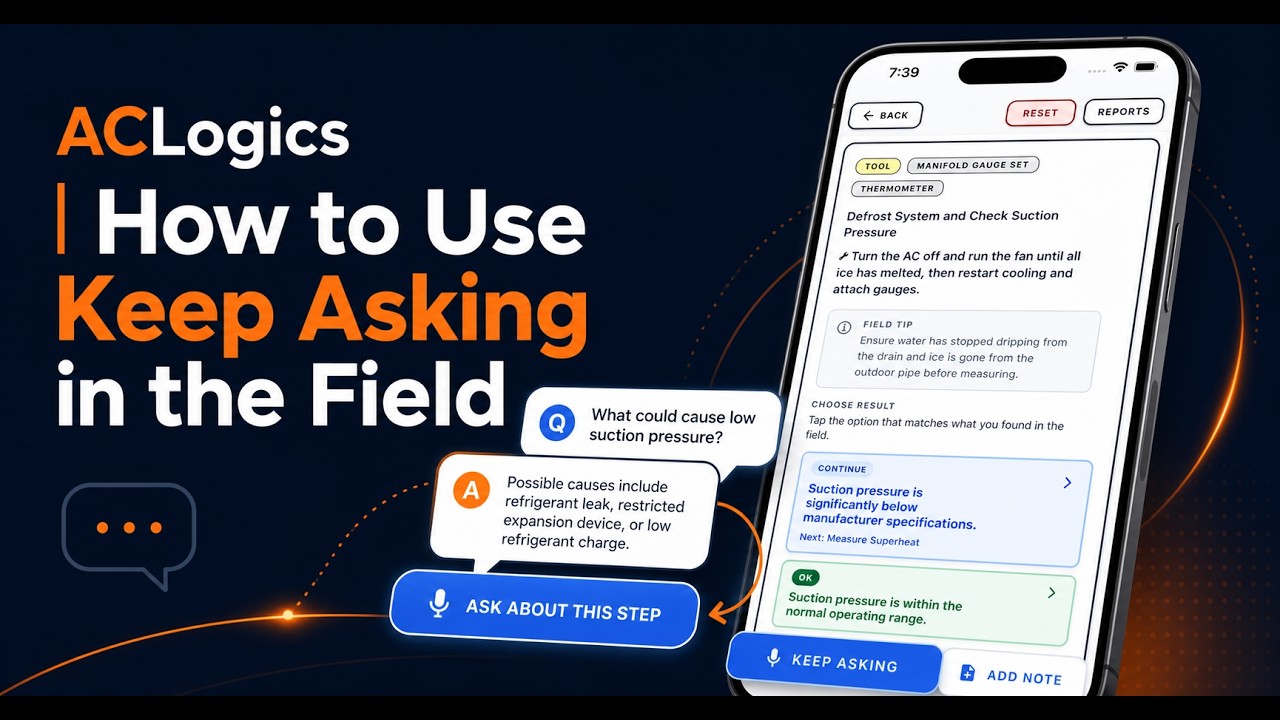
When you hit a step that isn’t clear, take your hands off the unit. At the bottom of the ACLogics app, there’s a blue button labeled Ask About This Step. Tap it, and a Q&A dialog opens in context — it already knows which diagnostic you’re running and which step you’re on.
From there, type or speak your question. The assistant gives you a step-by-step breakdown of whatever you asked, grounded in the current diagnostic context. You don’t have to describe the system from scratch or navigate away from the job.
What a real conversation looks like
During a Defrost System and Suction Pressure check in the video, the technician asks how to determine whether suction pressure is in range. The assistant walks through four things: identify the refrigerant type by checking the data plate, connect the manifold gauges to the low-side service port, read the Saturated Suction Temperature (SST) off the gauge’s temperature scale rather than just the PSI, and compare against refrigerant-specific benchmarks.
For R-410A, that’s roughly 101–130 PSI (assuming 75°F indoor temps). For R-22, 58–76 PSI in the same range.
The technician then corrects the assistant: the system uses R-454B, not R-410A or R-22. The assistant doesn’t skip a beat — it recalculates using A2L refrigerant benchmarks and notes that R-454B pressures run slightly lower than R-410A at the same conditions. That correction took one message, and the rest of the conversation stayed on track.
That back-and-forth matters. The assistant starts from reasonable defaults, but you’re the one in front of the equipment. When you know something it doesn’t — refrigerant type, a previous repair, an abnormal reading — you can correct it, and it adjusts.
After you get your answer
The action loop from there is straightforward: confirm the logic makes sense against what you’re actually seeing, grab your tools and take the physical measurement, enter the result into the app, and proceed to the next step. The video closes on that three-part cycle — confirm logic, take measure, enter result — as the repeatable pattern for moving through any step you needed to clarify.
Keep Asking works best when you treat it like a conversation with a knowledgeable peer rather than a search bar. Ask specifically about what the step requires. Correct it when it’s wrong. The more context you give it, the more useful the answer.
Watch the full walkthrough on the ACLogics YouTube channel.